In this guide
A producer has an older stereo mix, a new remix idea, and no access to the original multitrack session. The kick is buried under bass, cymbals wash into the vocal reverb, and the first extracted stem sounds convincing until a compressor makes the artifacts obvious. That is the task at hand when trying to isolate drums from a song: not merely generating a file, but deciding which parts are usable.
Drum isolation works well for practice, beat analysis, rough arrangements, creative sampling, and remix preparation. It doesn't recreate an untouched studio multitrack, and the result should be treated as an estimate that needs to be checked against the original.
What Drum Isolation Actually Solves
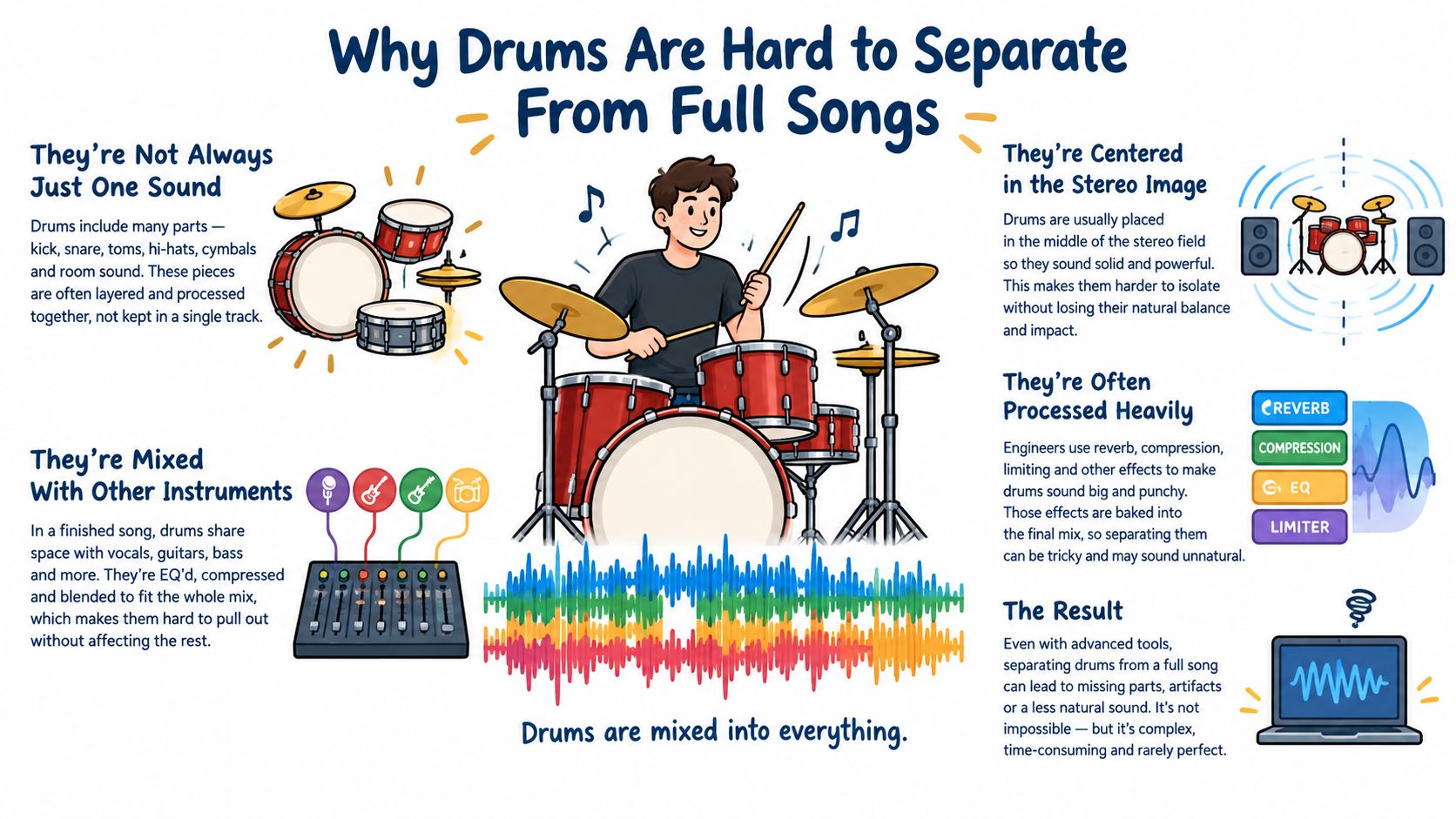
A finished song contains several sounds occupying the same time and frequency space. A kick may overlap bass, a snare may share energy with guitars or keys, and cymbal decay may blend into vocals, room ambience, and stereo reverb. Source separation can make the drum performance more accessible, but it can't reliably recover every microphone or every individual drum from a stereo master.
Saturalabs is a text-guided audio and video isolation service, not a general video editor or music generator. The workflow is simple: upload a supported recording, describe one audible source, and review the two related outputs.
- Isolated sound keeps the source named in the prompt.
- Background audio keeps the remaining recording with that target removed.
For a producer studying a groove, the useful output is usually Isolated sound. For a drumless backing track, Background audio may be the practical choice. The same distinction applies elsewhere: karaoke users generally isolate “vocals” and choose Background audio, while speech work usually calls for “spoken voice” and Isolated sound.
Choose the workflow by the intended result
A practice stem only needs clear kick and snare placement. A sample intended for chopping needs cleaner beginnings, endings, and cymbal tails. A remix stem may need to survive compression, sidechain processing, looping, and level changes without exposing bleed.
That difference matters more than the label “AI isolated.” A result can be perfectly adequate for learning a beat but unsuitable as a replacement drum track in a commercial production. The source recording, arrangement, effects, and mastering all affect the outcome.
Practical rule: Treat the first export as a listening candidate, not as a finished multitrack stem.
Upload the cleanest available mix, preferably an uncompressed WAV when one is available. A compressed MP3 can still be useful, but encoding damage and mastering effects may become part of the separation problem.
How to Write Prompts That Isolate Drums
Text-guided isolation responds best when the prompt names one audible source at a time. Start with the broad target, then add only the detail needed to resolve ambiguity. “Drum kit” is a strong first request for a conventional arrangement because it identifies the kick, snare, toms, hi-hats, cymbals, and percussion as one musical family without asking the system to reconstruct an unlimited set of stems.
Useful prompt examples include:
- Full kit: “drum kit, including kick, snare, toms, hi-hats, cymbals, and percussion”
- Kick: “kick drum”
- Snare: “snare drum”
- Cymbals: “cymbals and hi-hats”
- Percussion: “hand percussion”
- Electronic parts: “electronic drum hits and percussion”
The longer full-kit prompt is useful when the entire rhythmic performance matters. A narrower request can help when the producer needs to inspect one component, such as a kick pattern or cymbal texture, but it shouldn't be expected to create a clean microphone-isolated channel.
Keep the prompt aligned with the job
For beat transcription or practice, request the drum source and listen to Isolated sound. The question is whether the rhythm remains clear enough to follow. For a backing track or karaoke-style edit, request the source that needs to be removed and audition Background audio instead.
A prompt such as “remove bass, vocals, guitars, piano, room, and reverb, leaving only perfect drums” asks for several exclusions and an unrealistic outcome. It also gives the separation task less precise direction than a concise noun phrase. The audio isolation prompt guide provides related guidance for describing one sound clearly without turning the request into a list of competing instructions.
Use one pass per audible source
If the recording contains a kit plus a tambourine, the first pass should target the drum kit. A second pass can test “tambourine” separately if that sound matters to the arrangement. This makes the review easier because the producer can tell which artifact belongs to which request.
Prompt specificity should follow what can be heard. “Acoustic drum kit” fits a live kit, while “electronic drums” fits a programmed or triggered performance. If the song has a prominent shaker, conga, or claps, naming that source separately may produce a more useful result than adding every percussion term to the initial prompt.
Why Drums Are Hard to Separate From Full Songs
Drums don't occupy one tidy acoustic range. Kicks and toms are membranophones with strong low and low-mid energy, while cymbals and hi-hats are idiophones with broad high-frequency content. A separation system has to distinguish these changing patterns from bass, guitars, piano, vocals, ambience, and effects that may occur at the same time. Research on percussion separation describes this broad spectral overlap and the leakage artifacts that can result from masking.
A useful reference point is MUSDB18, introduced for the 2018 Signal Separation Evaluation Campaign. The dataset contains 150 full-length stereo tracks totaling approximately 10 hours of music, divided into four categories: vocals, drums, bass, and other instruments. It uses 100 training tracks covering about 6.5 hours and 50 test tracks covering about 3.5 hours, creating a reproducible way to compare systems on complete musical arrangements rather than short artificial clips. The MUSDB18 paper describes the benchmark structure and its four reference stems.
What benchmark results can and can't tell producers
MUSDB18 is valuable because it preserves full-song structure, including arrangement changes and silent passages. It also reveals an important limitation: the drum target is already one broad category, while everything else is interference. An extracted drum result can therefore retain traces of bass, vocals, cymbals, or other instruments without indicating that the system has failed completely.
Published evaluations show measurable progress but not clean-studio recovery. On the MUSDB18 test set, one reported drum SI-SDR result improved from -3.8 dB for the unprocessed mixture to 2.2 dB for a model trained on MUSDB18, and to 3.6 dB after training was expanded with Slakh, as reported in the comparative evaluation. Other evaluations report drum SDR around 8.58 dB for Hybrid Demucs, while a later comparison reports 8.42 dB for HDemucs v3 and 14.52 dB drum SIR in its stated protocol.
Those figures compare systems under defined conditions. They don't tell a producer whether a cymbal crash will survive a loop, whether a snare attack will remain natural, or whether compression will expose vocal bleed. Dense choruses, distorted guitars, reverberant hits, and kick-and-bass overlaps remain difficult because the desired and unwanted sounds share both timing and energy.
Common Drum Isolation Artifacts and How to Spot Them
The most useful review happens in the DAW, not in a benchmark table. A stem can preserve the general rhythm while losing the transient that makes a kick feel solid. It can also sound clean in a full mix and reveal metallic cymbals, pumping ambience, or vocal remnants after editing.
Listen for these specific symptoms:
- Watery cymbals: Hi-hats and crashes sound phasey, chorused, or unstable during decay.
- Hollow attacks: The snare or kick keeps its rough shape but loses the compact impact of the original transient.
- Missing hits: A quiet ghost note, fill, or isolated percussion hit partly disappears.
- Bass pumping: Low-frequency energy rises and falls unnaturally as the separator tries to distinguish kick from bass.
- Vocal remnants: Breath, consonants, or sustained vowel tones remain around snare and cymbal events.
- Metallic texture: High-frequency residue becomes obvious when the stem is soloed or brightened.
Metrics are useful, but they aren't the final judge
SDR summarizes overall reconstruction quality relative to distortion. SIR focuses more directly on suppression of competing sources. Other measures address artifacts and spatial changes, but none replaces listening to the actual passages that will be edited.
| Metric | What It Measures | When It Matters Most |
|---|---|---|
| SDR | Overall distortion relative to a reference source | Comparing broad reconstruction quality |
| SIR | Interference from competing sources | Judging bass, vocal, or instrument bleed |
| SAR | Accidental artifacts introduced by processing | Checking metallic, watery, or synthetic textures |
| ISR | Spatial distortion and stereo-image changes | Evaluating stereo cymbals, room sound, and ambience |
Research has found that scale-invariant signal-to-artifacts ratio can predict listener judgments of drums and bass better than SDR alone, which reinforces the need to inspect audible artifacts rather than rely on one score. The evaluation discussion also distinguishes the different problems captured by these measures.
A stem that sounds acceptable before processing may become unusable after compression, chopping, or sidechain treatment.
For repair-oriented work, an online audio repair workflow can be relevant after isolation, but repair shouldn't be used to disguise a missing transient. If the source attack is gone, heavy processing often emphasizes the defect instead of restoring the original performance.
Practical Workflow for Isolating and Verifying Drums
A reliable workflow separates generation from approval. The producer first creates a candidate, then tests it under the conditions in which it will be used.
1. Prepare the source
Use the highest-quality available mix. Saturalabs accepts MP3, WAV, MP4, and MOV files up to 50 MiB (52.43 MB), so a video file can be tested when the drum performance is embedded in a visual production. A WAV usually gives the separation process more intact information than a heavily compressed upload.
Keep the original file in the session. The original is the reference for timing, stereo placement, transient shape, and the exact sections most likely to fail.
2. Request one clear source
Start with:
“drum kit, including kick, snare, toms, hi-hats, cymbals, and percussion”
If the arrangement is simple, “drums” may be enough. If only a specific part matters, use “kick drum,” “snare drum,” or “cymbals and hi-hats.” Avoid asking for drums, bass, vocals, guitars, and piano in one prompt because the task is designed around a single described source.
The Saturalabs Drum Extractor is suited to this keep-the-drums or keep-the-rest workflow. After processing, audition Isolated sound for the drum stem and Background audio for the remaining recording.
3. Compare before downloading
Play Isolated sound against the original at normal listening level. Then check it solo, in mono, and at a lower level. Mono playback can expose phasey cymbals and unstable stereo residue that sounds less obvious across wide monitors or headphones.
Inspect the sections most likely to reveal problems:
- dense choruses with several layers playing together
- kick-and-bass overlaps
- cymbal crashes and long reverberant tails
- fills and transitions
- distorted guitar or synth transients
- quiet gaps surrounding isolated hits
The comparison should include Background audio as well. If the target was meant to be removed for a backing track, drum leakage in that output may matter more than the quality of the isolated stem.
4. Test the stem for its actual use
For practice, check whether kick and snare attacks remain rhythmically clear. For sampling, inspect the start and end of the chosen passage for bleed, ambience, and truncated tails. For remixing, apply the planned compression, saturation, looping, or sidechain treatment to a copy and listen for artifacts that become exaggerated.
A published evaluation of HT-Demucs reports median drum SDR of 10.11 dB on the 50-song MUSDB18 test split, while another model reports 11.49 dB, as summarized in the model evaluation material. These values are not percentages of drums recovered, and they don't guarantee a suitable result for a particular commercial mix.
5. Repair the decision, not just the audio
If a short passage fails, isolate a shorter target rather than forcing the entire song through the same judgment. Try a more specific prompt, retain the original mix underneath, or use only the cleanest bars. A stem that works for a groove may not work for a one-shot sample.
Before downloading, check the displayed credit cost. Users should also retain the rights to the uploaded recording and verify permission for the intended reuse. Separating a recording into stems doesn't provide copyright clearance. The U.S. Copyright Office guidance on sampling and remixes explains that samples, remixes, and mashups can implicate exclusive rights unless authorization or a valid legal exception applies.
For related production tasks, a guide to stems versus audio isolation can help clarify why an estimated source from a finished mix differs from an original multitrack stem.
Saturalabs lets producers upload a supported audio or video file, describe one drum source in plain language, and review both the isolated drums and the remaining recording. Visit Saturalabs to test a drum-kit prompt, compare difficult passages with the original, and decide whether the result fits practice, sampling, or remix work before downloading.