
In this guide
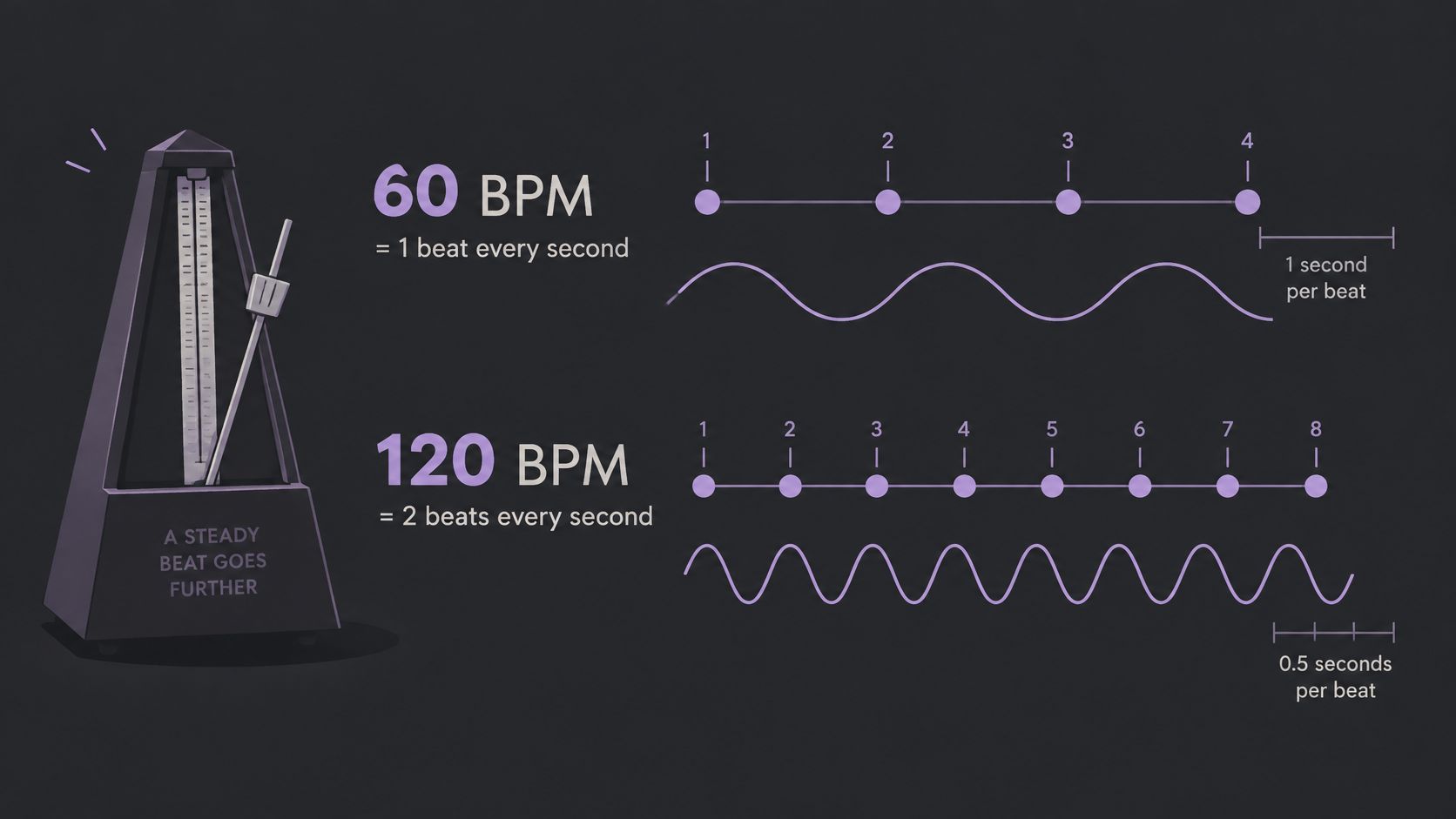
BPM means beats per minute, so 60 BPM is one beat every second and 120 BPM is two beats every second. That's the direct answer to what is the BPM in a piece of music, but it raises a question most short answers skip. If two tools report different numbers for the same recording, which one is wrong, and which sound were they measuring?
A full mix, an isolated drum kit, and a track that's mostly speech can point a detector toward different pulses. The number only helps when the reader knows what was counted, how steady it was, and whether a click played against the original stays in place. Readers who understand that difference can sync edits, loops, and effects with far fewer surprises.
What BPM Means and the Tempo Ranges Musicians Use
BPM stands for beats per minute, the number of pulses in one minute that a listener would tap or move to. The arithmetic stays simple at every speed. 60 BPM divides into one beat every second, and 120 BPM divides into two beats every second, so a higher number always means a faster pulse.
That pulse isn't a count of every sound in a recording. As a review of musical tempo research in PubMed Central explains, BPM describes the underlying pulse, and music can contain eighth notes or sixteenth notes inside each beat. A busy recording can therefore have a slow tempo, while a sparse recording can move quickly.
Traditional Tempo Markings as Reference Points
Musicians also used descriptive words long before they relied on numbers for every rehearsal or edit. Those words still give students a quick way to place an unfamiliar tempo, even though performers interpret them with some flexibility. The table below keeps the usual ranges in one place for comparison.
| Tempo marking | Typical BPM | Musical feel |
|---|---|---|
| Largo | 40-60 | Very slow and broad |
| Larghetto | 60-66 | Slow, a little lighter than largo |
| Adagio | 66-76 | Slow and relaxed |
| Andante | 76-108 | Walking pace |
| Moderato | 108-120 | Moderate |
| Allegro | 120-168 | Fast and lively |
| Presto | 168-200 | Very fast |
| Prestissimo | Above 200 | Extremely fast |
These ranges are conventions, not laws. Meter, phrasing, performance style, and beat subdivision all affect how fast a passage feels, and two performers can read the same marking at slightly different speeds. A waltz at moderato won't feel identical to a pop chorus in the same range.
Start with feel before precision. Match a familiar song to a row in the table, then use that row as a reference before measuring.
That first match keeps later counting honest. If a song feels like a relaxed walking pace but a detector reports a prestissimo value, the problem is probably the measurement method, not the listener's ear. The table gives the ear a starting point, and counting supplies the exact number afterward.
Pulse, Subdivisions and Where BPM Applies
Think of the pulse like a heartbeat underneath the other activity in a recording. A foot tap usually follows that steady beat, even when singers add runs or drummers add extra hits between beats. Counting those extra hits as beats is the most common reason a beginner doubles the true tempo.
Say a track runs at 120 BPM and the hi-hat plays eighth notes. The hi-hat sounds eight times in a four-beat bar, but the tempo stays 120 BPM because the pulse is the quarter-note beat. The subdivisions add motion and texture, not a new tempo.
Meter Changes the Grouping, Not the Idea
Meter groups those beats into bars. A 3/4 waltz groups beats in threes, while 4/4 pop groups them in fours, and BPM refers to the beat inside that meter. The grouping shapes the feel, but it doesn't change what one beat means.
That idea became easier to share once performers could set a number. As the Journal of Antiques history of the metronome recounts, Johann Maelzel patented a numbered metronome in 1815, after Dietrich Nikolaus Winkel developed a musical chronometer in 1814. Descriptive terms could then be paired with a repeatable setting, and the same value now serves as the timing grid in DAWs, sequencers, DJ software, and tempo-synced effects.
What Typical Pop Tempos Look Like
Modern chart music doesn't spread evenly across every speed. A 2024 analysis of Spotify top tracks by Carnegie Mellon University student researchers reported a mean tempo of 122.5404 BPM, a median of 121 BPM, and a range from 65 to 206 BPM. Readers cutting video can translate that kind of number into time, since 120 BPM gives a beat every half second and a cut every two beats lands at one-second intervals.
Speech needs a different judgment. Dialogue and podcasts don't carry a meaningful BPM, so editors should measure only the music bed or the music inside a video, and readers working on speech clarity can use the guide on removing background noise from video instead. A higher BPM also doesn't mean louder or more energetic, and live recordings may drift, so it's wise to check the start, middle, and end rather than trusting one short excerpt.
How to Count and Tap Your Way to a BPM Reading
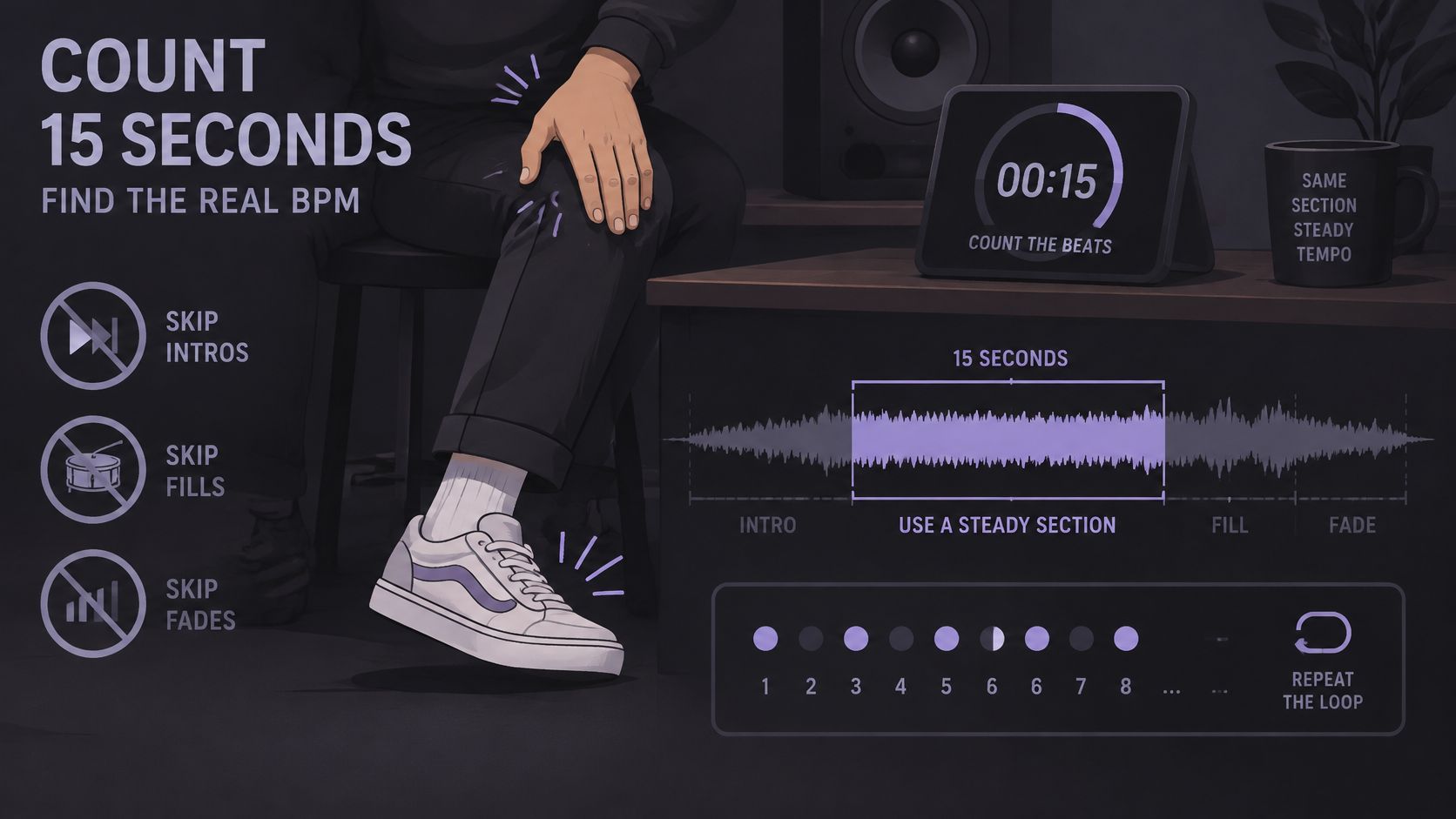
Manual counting teaches the ear what an automatic number is supposed to represent. It needs only a timer and a section where the pulse is clear, and it works before any project settings change. The steps below use 15 seconds because the math is easy to check.
The 15 Second Counting Method
- Pick a steady section. Choose 15 seconds with a clear pulse and avoid intros, fills, breakdowns, and fades, because those passages often hide or bend the beat.
- Count while tapping. Start the timer on a beat, tap a foot, and follow the kick drum or another steady pulse rather than every instrument hit.
- Multiply by four. A count of 30 beats in 15 seconds becomes 120 BPM, because four 15-second blocks fill one minute.
- Repeat elsewhere. Count a second section and compare, since two readings within a few BPM suggest the pulse was identified correctly.
The DAW Tap Tempo Method
- Open tap tempo. Find the tap control in the DAW project or use a dedicated tool such as the Saturlabs tap tempo calculator in the browser.
- Tap the target beat. Tap at least four times, aiming for the kick or a clear snare, because averaging several taps reduces the effect of one early or late hit.
- Apply the averaged value. Set the project to the displayed BPM so loops, edits, and the click share the same grid.
- Play against a click. Run the click with the audio and listen across the full section, since drift reveals either a wrong value or a performance that speeds up or slows down.
Two slips cause most bad readings.
- Counting the hi-hat: Eighth-note hats can double the reading when they're mistaken for the beat.
- Tapping the offbeat: A consistent offbeat can feel musical, but an uneven offbeat usually produces an unstable number that jumps between taps.
A correct result isn't just a plausible number on screen. The click stays on the kick across the whole section, without gradually moving ahead or falling behind. When that happens, the reader has both a BPM value and audible evidence that it fits.
Automatic Detectors and Where They Go Wrong
Automatic detection saves time, but speed isn't the same as certainty. Each method suits different material, and the quickest answer deserves the most careful check when the beat is buried or ambiguous. The table compares the three approaches before the failure cases get closer attention.
| Method | Best for | Main risk | Time needed |
|---|---|---|---|
| Manual counting | Steady tracks and quick checks | Miscounting subdivisions | 1 to 2 minutes |
| DAW tap tempo | Projects, loops and live tempo | Tapping the wrong beat | Under 1 minute |
| Automatic detector | Quick estimate of a full track | Half-time or double-time errors | Seconds |
Half Time and Double Time Errors
A detector may report 70 BPM for a track that listeners tap at 140 BPM, or it may make the reverse mistake. Both values can align with real drum hits, so the software hasn't necessarily failed to hear rhythm. It has chosen a different level of the rhythm as the beat.
That choice matters in editing. At half the intended tempo, bars stretch twice as long on the grid, loops land at unexpected points, and tempo-synced delays repeat at the wrong musical interval. At double tempo, cuts and effects can feel twice as busy as planned.
Verification step: Take the detector result, double it, halve it, and tap along with each option. Keep the value that matches the natural foot tap.
Drift and Passages Without a Clear Beat
Tempo drift creates a different problem. A live band may push a chorus or relax a verse, so one BPM fits the opening but not the ending. A detector that averages the whole file can produce a tidy number that doesn't sit comfortably anywhere for long.
Ambient intros, rubato piano, and sections built from pads give a detector little to lock onto. It performs best on a clearly pulsed, consistent recording with a strong kick, a click-like pattern, or another repeated onset that marks the beat. Sparse material calls for manual counting on the steadiest section available, followed by a click check.
When methods disagree, neatness shouldn't decide the winner. Trust the reading that has been played against the audio with a click and held its place. That audible test connects the number to the recording the audience will really hear.
Isolating Stems for a Cleaner Tempo Read
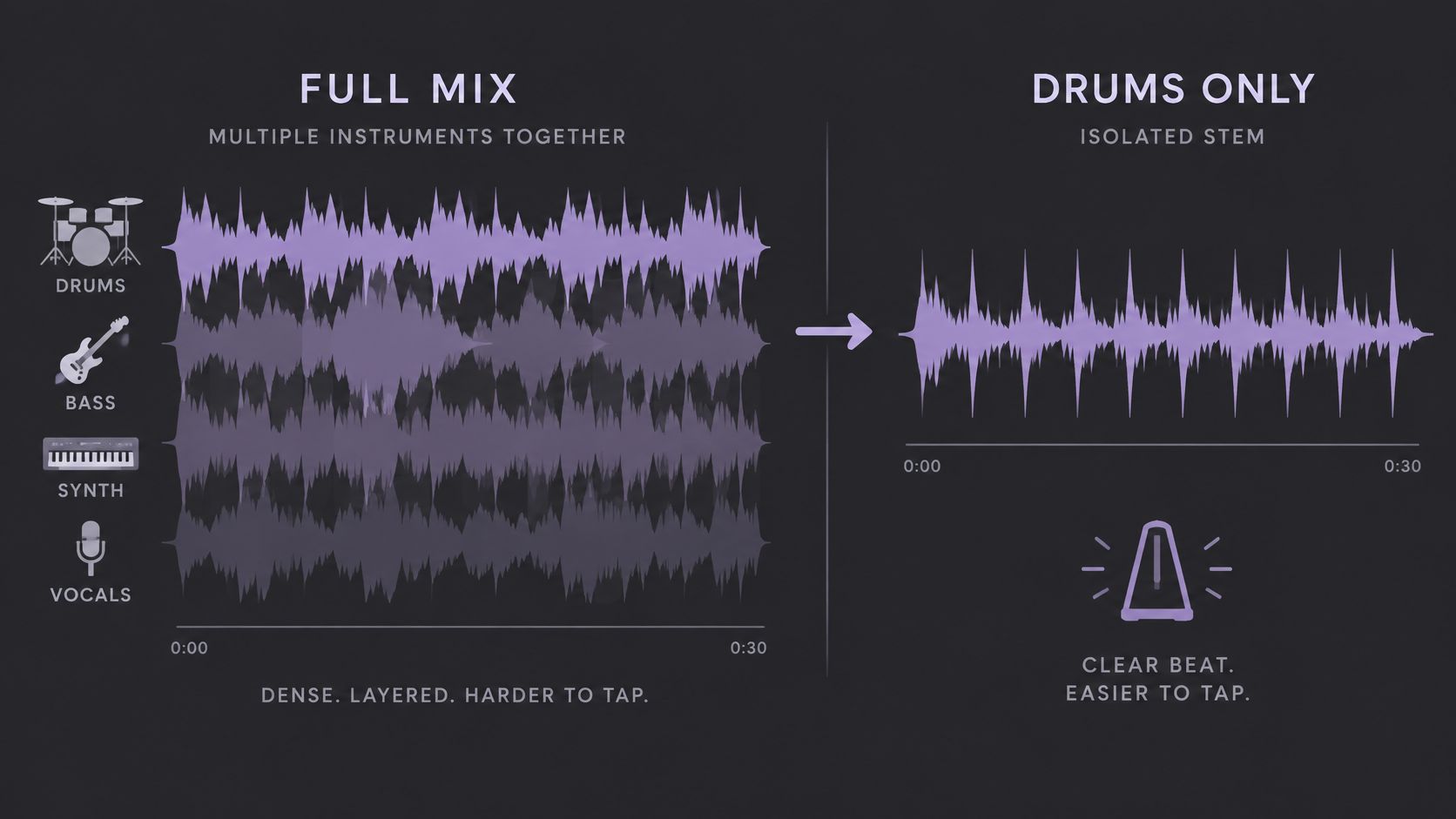
A dense mix can mislead both ears and software. Drums, bass, synths, guitars, and vocals may emphasize different subdivisions, so a detector can latch onto a busy pattern instead of the main pulse. Isolating the drum kit gives the tap or detector fewer competing rhythms to follow.
A Concrete Isolation Workflow
Upload an MP3, WAV, MP4, or MOV file up to 50 MB and name one audible source per prompt. A focused prompt such as "drum kit" or "kick and snare" gives the separation a clearer target than a long list of instruments. Choose Isolated sound to keep the drums, then count, tap, or run a detector on that output.
Readers comparing estimated parts with true multitrack files can review the distinction in the guide on stems versus audio isolation. A stem splitter workflow is useful here because the immediate goal isn't a polished remix. It's a cleaner timing reference that makes the pulse easier to identify.
Listen for Separation Damage Before Measuring
Separation quality depends on the recording, and the output shouldn't be accepted automatically. Research on real-world soundtrack separation describes artifacts in separated outputs as a continuing problem and notes that imperfect separation can reduce listening quality and harm downstream tasks. For tempo work, missing kick hits, smeared transients, or cymbal remnants can all shift what a listener counts.
Compare the same difficult passages in the isolated drums and the original before downloading. Pay attention to crowded choruses, heavy reverb, quiet hits, and places where vocals overlap the beat, then check the displayed credit cost before any download. If the isolated version drops the very hits that define the pulse, the full mix remains the better source for counting.
Isolation also has a firm limit. It can't create a steady pulse where the source has none, such as a freely timed rubato vocal or a spoken introduction. In those cases, measuring a later section with drums or another regular pattern gives a more honest result than forcing one number onto the whole file.
Decide Which BPM Reading to Trust
A final BPM choice should survive a few practical checks before it controls a practice session, remix grid, or video edit. The checks below don't repeat the counting process. They help the reader decide whether a number already on screen deserves to be used.
- Check half or double first: If two readings differ by more than a few BPM, test the half-time and double-time versions against the natural foot tap before accepting either.
- Isolate when the mix obscures the pulse: If a detector disagrees with a tap on a dense recording, isolate the drum kit or another single source and measure that output again.
- Confirm with a click: Play the final value against the original at the start, middle, and end, because a good reading for one chorus may drift elsewhere.
- Start with a short section: Processing costs approximately 10 credits per minute for most Saturalabs tools, so checking the displayed cost on a short excerpt first helps control the expense before a full file is processed.
- Confirm permission: Readers should own the upload or have permission for the intended use, since the U.S. Copyright Office guide for musicians explains that a recorded song can contain separate rights in the musical work and the sound recording.
That last check matters for projects built from matched tempos, including a track assembled by following a guide on how to make a mashup of songs. Isolation doesn't clear copyright or grant rights to remix, publish, or post the result. Rights sit outside the measurement problem and need their own answer.
A trustworthy BPM is not the fastest result or the one with the most decimal places. It's the value that keeps a click with the recording where the edit will happen.
For a crowded file, the direct next step is to isolate one source, such as the drum kit, measure that clearer pulse, and listen against the original before downloading. Short test sections, careful listening, and a click check cost little time compared with rebuilding an edit on the wrong grid.
Saturlabs helps creators isolate one named sound from an audio or video upload, compare the result with the original, and download the version that fits the job. For a cleaner tempo read, that means extracting the drum kit or another pulse-defining source before counting, tapping, or setting a project grid. Start with a short section at Saturalabs and check the result against the original before downloading.