In this guide
A producer has a finished mix but needs the singer alone for a remix. A video editor has an interview with music baked into the recording. The first separation sounds promising, until the chorus arrives or a speaker's consonants turn watery.
To extract vocals from audio, the useful workflow is upload, describe one audible source, and audition the result against the original. The important decision isn't whether the voice sounds louder. It's which output preserves the material the project needs, especially in the hardest passages.
Choose the Vocal Output Your Project Needs
Prompt and output by goal
| Goal | Prompt to type | Output to audition first |
|---|---|---|
| Acapella for a remix | vocals | Isolated sound |
| Karaoke backing track | vocals | Background audio |
| Spoken voice from an interview | spoken voice | Isolated sound |
| Speech without background music | background music | Background audio |
| Lead singer from a duet | lead singer | Isolated sound |
Each prompt names one audible source. Isolated sound keeps the estimated target, while Background audio contains the remaining recording with that target reduced. The same prompt can therefore serve opposite goals.
For an acapella, the singer is the wanted material. For karaoke, the singer is the material to remove, so the useful result is the accompaniment rather than the isolated voice.
Saturalabs provides text-guided audio/video isolation, not a general video editor or music generator. It separates a described voice, instrument, or sound effect from an uploaded recording and returns the target alongside the remaining mix.
Define what counts as useful
A remix producer needs enough vocal detail to survive placement against new instrumentation. An editor preparing an interview needs intelligible words, natural breaths, and consistent speech tone. A karaoke user needs the backing track to retain its drums and musical detail, even when removing the singer proves difficult.
Practical rule: Choose the output by what the project needs to keep, not by the name of the separation task.
These distinctions matter because vocal harmonics can overlap closely with accompaniment. A music and speech separation study published in Transactions of the International Society for Music Information Retrieval discusses how evaluation conditions can limit generalization to uncontrolled recordings. A polished example isn't proof that a reverberant interview or densely layered duet will separate equally well.
The duet prompt also needs realistic expectations. Describing a lead singer doesn't guarantee a singer-only result when voices overlap, and a voice description can retain another speaker or singer. A description identifies an audible source characteristic, not a person by name.
When original stems already exist, those files should take priority. Separation estimates material from a mixed recording; it doesn't retrieve the original session export. The guide to stems and audio isolation explains that distinction for projects with access to multitrack assets.
Prepare the File for a Cleaner Separation
Check compatibility first. Saturalabs accepts MP3, WAV, MP4, and MOV files up to 50 MiB (52.43 MB). For an oversized file, an editor should export a shorter copy containing the relevant material rather than repeatedly compressing the whole recording.

Start with the highest-quality available source. A session export is preferable to a copy that has passed through repeated lossy encodes. Converting a damaged MP3 to WAV won't restore missing information, although it can avoid another lossy encoding stage.
Prepare a demanding test passage
A useful test contains the material most likely to fail: a dense chorus, doubled vocals, harmonies, strong drums, and a loud peak. For example, an editor could export a 20 to 60 second passage containing those transitions rather than testing only an exposed opening line.
- Standardize the sample rate. When assembling material from mixed-rate sources, export the test at one consistent rate before upload.
- Inspect the peaks. Audible crackling or flattened loud syllables may already exist in the original; those defects shouldn't be mistaken for new separation artifacts.
- Identify vocal processing. Centered vocals, stereo doubles, heavy reverb, and delay each create different listening problems.
- Check video audio. The uploaded clip must contain the intended soundtrack, and the source described in the prompt must be audible.
The audio-separation paper on time-frequency mask estimation describes separation through estimated masks and reconstruction rather than simple filtering. That distinction explains why removing a frequency band isn't equivalent to extracting a singer: instruments and voices occupy overlapping regions.
The audio preparation guide provides additional input checks. The test passage should run first; the full recording should follow only after the result meets the project's needs.
How to Run One Isolation Pass in Saturalabs
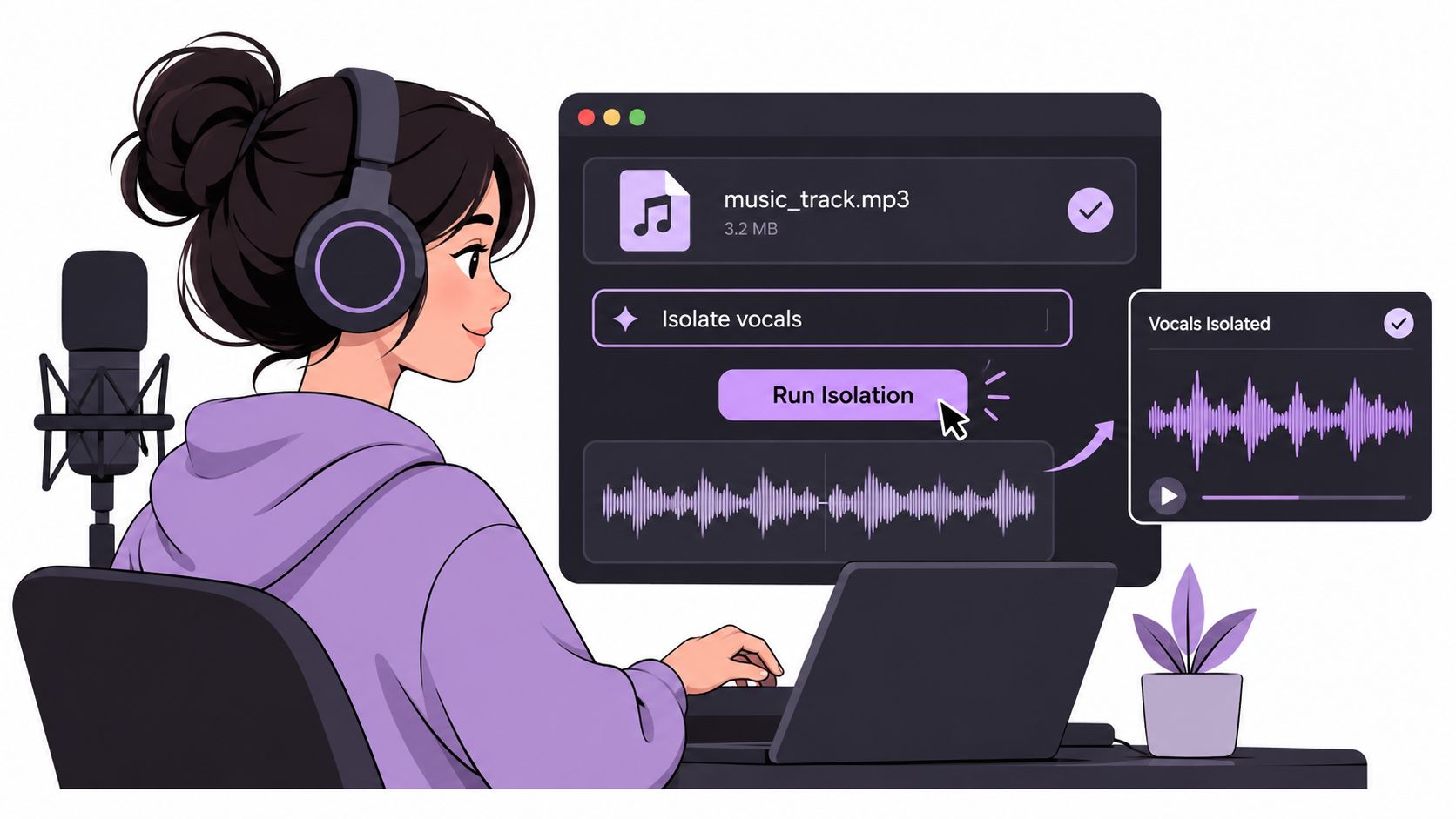
The browser workflow has a simple core: add audio or video, describe one sound, then compare both tracks. Keeping the first pass narrow makes it easier to identify whether a problem comes from the source, the description, or the selected output.
Run the test before the full recording
Upload the prepared test file. The difficult passage is a better starting point than the whole song or interview because its weaknesses are easier to locate and compare. For video, the selected clip should include the exact speech or singing needed for the edit.
Describe a single audible source. Suitable entries include vocals, lead singer, spoken voice, or background music. Combining a singer and a guitar in the same description makes it harder to tell whether the target was captured correctly.
Choose which output to audition first. The project's intended use determines the first listen, but both Isolated sound and Background audio come from the same pass. Choosing a listening priority doesn't turn the pass into a different type of separation.
Start the separation and wait for the results screen. Processing time shouldn't be treated as a quality indicator. Once results appear, the editor should compare the exposed vocal detail and difficult transitions instead of downloading immediately.
Check the displayed credit cost. The results screen shows the cost before the chosen WAV is downloaded. Downloads require an account and sufficient credits, so the displayed cost should be reviewed each time rather than assumed from a previous job.
Download the chosen WAV and retain the original. Clear filenames should identify the source, prompt, and chosen output so later comparisons remain straightforward. For a video upload, the download is audio rather than a finished video, so picture alignment belongs in the editing application.
Keep additional targets separate
A second target needs another pass with its own description, not a longer prompt. Extracting vocals and then investigating a guitar are separate tasks; the tool doesn't split every instrument into its own file at once.
A useful prompt identifies an audible source. It isn't a request to repair clipping, rebuild missing syllables, and remix the entire recording.
Plans and credit rates can change, so current pricing should be confirmed on the Saturalabs site. The practical checkpoint remains the cost displayed before download, followed by a decision about whether the auditioned result is worth keeping.
Audition Both Tracks Against the Original
Start with the hardest five to ten seconds, then compare the original, Isolated sound, and Background audio at the same passage. A short loop makes vocal residue easier to hear than skimming the full song.
Once that section holds up, play the full chorus or speech passage. A transition into harmonies, an overlapping speaker, or a cymbal crash can reveal damage that a steady phrase hides.
Listening checks by passage type
| Passage type | What to listen for | Usable when |
|---|---|---|
| Chorus or densest section | Cymbals and guitars leaking into the vocal | Accompaniment is faint and the vocal stays intact |
| Sibilant consonants and breaths | Missing or watery consonants | Words remain clear against the original |
| Cymbal hits | Harsh or smeared high frequencies | Transients sound like the original |
| Reverb or delay tails | Tails cut off or chopped | The decay runs smoothly |
| Pauses and sustained notes | Accompaniment bleeding into silence | No obvious leakage in quiet moments |
Judge preservation, not just removal
Match playback levels before comparing. A louder version can seem better even when it has more residue or processing damage. Lower the monitoring volume to reassess the balance without forceful playback.
For an acapella, listen for a convincing voice through pauses, sustained notes, and exposed consonants. For karaoke, judge whether the accompaniment still works without unacceptable damage to drums, guitars, or high-frequency detail.
A clean first verse proves little about a layered chorus.
Each separation pass targets one described source, so the two outputs can serve opposite goals. Keep Isolated sound when you want the named source; keep Background audio when you want the rest of the recording with that source reduced. Separation can leave bleed, change tone, or introduce artifacts, and it cannot guarantee recovery of missing words or notes. Choose the track that preserves the material your project needs, even if some compromises remain.
Fix Common Artifacts and Weak Separations
Instruments audible underneath the singer are a common reason to reject an extraction. Dense arrangements and overlapping sources make that leakage difficult to avoid; a more elaborate prompt won't necessarily resolve it.
A monaural vocal-separation study found that preserving phase information reduced artifacts. That finding supports an important distinction: an intelligible vocal can still contain processing damage, so intelligibility alone isn't enough to approve a result.
Symptoms, likely causes and fixes
| Symptom | Likely cause | Fix to try |
|---|---|---|
| Instruments audible under the vocal | Dense arrangement or overlapping sources | Test a shorter passage and audition Background audio |
| Watery, metallic or warbling tone | Phase errors or heavy processing | Shorten the passage and avoid lossy re-encoding |
| Missing consonants or breaths | Vocal detail lost in separation | Compare with the original and choose the output that keeps more |
| Harsh high frequencies near cymbals | High-frequency artifacts | Loop that section at low volume and re-run from a cleaner source |
| Distortion on loud peaks | Clipped source audio | Use an unclipped copy of the file |
| Reverb or delay tails missing | Tails removed with the target | Check the tails in Background audio |
Change the input before adding complexity
A shorter test makes diagnosis easier; it isn't a guaranteed quality improvement. Its value is that an editor can change one variable, such as the source copy or target description, and hear the difference without searching through the full recording.
Background audio is useful diagnostically even when the desired deliverable is an acapella. If important consonants or effects remain there, the target extraction has left wanted material behind. That doesn't make the background a substitute vocal stem, but it explains why the isolated voice sounds incomplete.
Clipped peaks require a better source whenever one exists. Strong microphone wind and heavy reverberation can also limit isolation, particularly when the unwanted sound masks the same detail needed for intelligibility.
The vocal-removal artifacts guide provides a closer diagnosis of these defects. Repeatedly processing an already damaged output shouldn't be the default fix; returning to the original keeps the comparison meaningful.
Set an acceptance threshold
A small, consistent amount of bleed may be acceptable for private practice. The same leakage may be unsuitable for a commercial release, particularly when it becomes exposed during an intro, breakdown, or vocal pause.
The editor should judge the extraction both alone and in its intended arrangement. A defect masked by new accompaniment may still become obvious when the arrangement drops out.
Confirm Rights Before You Publish the Result
Extracting a vocal or backing track doesn't grant permission to use it. Technical access to an isolated file and legal authorization to publish that file are separate matters.
The U.S. Copyright Office's guide for musicians states that using another artist's sound recording or musical work generally requires authorization unless a license, public-domain status, statutory limitation, or applicable exception applies; it also explains that fair use has no automatic safe percentage or fixed number of musical notes.
Make the release decision deliberately
- Confirm recording rights. Permission should cover the uploaded recording, not merely possession of a downloaded copy.
- Confirm the intended use. Publication, distribution, remixing, and commercial use need their own rights assessment.
- Review the finished passage. The final listen should include every transition and exposed section used in the release.
- Preserve the source. The original file should remain available for comparison and future editing.
The remix workflow guide supports projects built around an extracted vocal. For accompaniment-focused work, the karaoke guide addresses the backing-track workflow.
Separated files download as WAV audio. A video project therefore needs the chosen track aligned with the picture in an editor, with sync checked before export.
Saturalabs offers text-guided isolation for extracting singing or speech from uploaded audio and video. A practical next step is to open the Saturalabs acapella extractor, run a difficult test passage with one vocal description, and compare both outputs before choosing a download.