

In this guide
Credits matter because audio isolation is metered cloud work, most tools use about 10 credits per minute of file duration, and the results screen shows the cost before the chosen WAV is downloaded. That display is the last checkpoint before a balance changes.
A creator often reaches that checkpoint with a deadline already fixed. A podcast interview needs cleaner speech. A practice track needs vocals removed. A short video needs music reduced under dialogue. The file gets uploaded, a prompt gets typed, and only then does the cost question appear.
That's why credit matters before processing starts, not after it. A short test can confirm the prompt fits the recording. A full file run without that test can spend the budget on the wrong output. Reading the displayed cost, listening to a difficult passage, and downloading only the needed version keeps the spend tied to a usable result.
Why One Isolation Uses Credits
In this guide, credit means the usage unit spent on Saturalabs tools. It doesn't mean consumer lending, a credit score, or borrowing. Readers looking for loan guidance need a different resource.
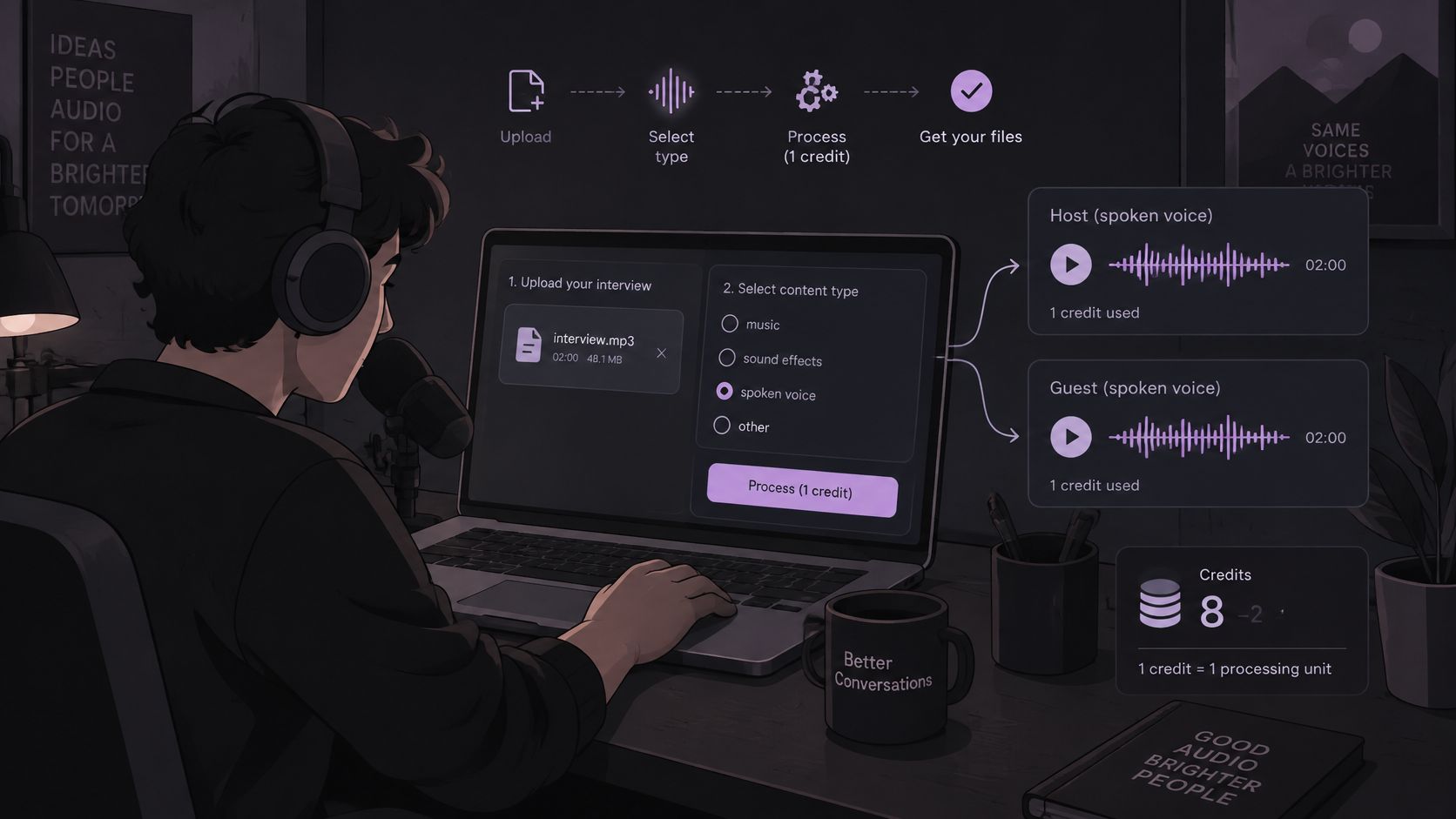
Say a podcaster uploads a two-minute interview clip and names "spoken voice" as the target. The expectation is simple. Two listenable outputs should appear. The work behind that result isn't a silent file transfer.
The Work Behind One Run
The browser receives the upload first. The service then decodes the audio, runs text-guided separation for the one named source, and creates Isolated sound and Background audio. Temporary files need storage while the results wait for review. A later download transfers the selected file back to the device.
Each stage uses pooled cloud resources. The NIST cloud computing evaluation based on SP 800-145 defines cloud computing as a model where processing, memory, storage, and network bandwidth are dynamically assigned according to demand, while usage is monitored and reported through metering. Credits translate that variable metering into one predictable unit.
Credits are units that customers spend to use paid features of Saturalabs. Saturalabs tracks credit usage and uses credits for credit accounting when generating outputs. A credit therefore records consumption. It doesn't certify quality.
Studio Time, Not a Guarantee
Credits resemble booked studio time. The room, engineer, and equipment are reserved for the session. The take can still be unusable if the performance overlaps, the microphone distorts, or room echo dominates. Payment for the time doesn't fix the source material.
Saturalabs isolates one audible source from an uploaded MP3, WAV, MP4, or MOV up to 50 MB. It's text-guided audio and video isolation, not a general video editor or a music generator. One prompt names one source, such as spoken voice or electric guitar.
Planning rule: Budget for a test, a revision, and a final export, not only for the first upload.
Separation can leave artifacts or drop wanted sound. Overlapping frequencies, reverberation, and heavy compression make that outcome more likely. The next decision is arithmetic. A balance needs to cover the full file plus at least one correction.
What Uses Credits and How Balances Behave
Processing costs approximately 10 credits per minute of file duration for most tools. A three-minute file therefore plans to about 30 credits. A fifteen-minute file plans to about 150 credits, before any repeat run.
That rate is an approximation for planning. The cost shown on the current job wins over any remembered number. A reader who estimates from duration first won't be surprised at the download step.
Reading the Balance Table
What changes a Saturalabs credit balance
| Action | Credit effect to plan for | Where to confirm it |
|---|---|---|
| Process a file with most tools | About 10 credits per minute of file duration | Current displayed cost before relying on the estimate |
| Reach the results | Cost for the chosen WAV is shown before download | Results screen |
| Download separated audio | Requires an account and sufficient credits | Balance plus the cost shown for that WAV |
| Run the file again with a new prompt | Another metered processing workload | New displayed cost for that run |
| Leave purchased credits unused | Packs do not expire unless a package says otherwise | Checkout or plan terms for that package |
| Use monthly subscription credits | They reset each month and do not carry over | Current plan period |
Processing scales with duration. That's the first row and the main planning driver. A short clip stays cheap because there's less audio to decode, separate, and store.
The results screen shows the credit cost before the chosen WAV is downloaded. That moment matters more than the upload screen. Listening happens first. Downloading happens second.
Downloads of separated audio require an account and sufficient credits. A completed separation that can't be downloaded doesn't help a project deadline. Checking the balance against the shown cost prevents a stalled export.
A new prompt is another metered run, not a free revision. Changing "voice" to "spoken voice" creates a fresh workload. The service decodes and separates again, so the balance should be planned for another charge at the new displayed cost.
Unused purchased credits and monthly credits behave differently. Rows five and six separate those two cases. Treating them as one pool leads to planning errors near a reset date.
Three Worked Estimates
One minute of dialogue plans to about 10 credits. A podcaster testing an interview intro can spend that amount to learn whether consonants survive. The cost stays small while the answer stays specific.
A four-minute karaoke chorus section plans to about 40 credits. That estimate covers one run only. If the lead vocal remains in the background output, a second run with a narrower prompt needs roughly the same budget again.
A file near the 50 MB cap needs a different check. Duration, rather than format, sets the estimate. A large video file with a short runtime can cost less than a smaller audio file that runs much longer. Reading the timeline length gives the better forecast, and the file size only confirms whether the upload fits.
Two Balances, Two Rules
Subscription credits reset each month and don't carry over. Unused monthly credits disappear at the reset. Scheduling a long project late in the period risks losing the allowance or rushing the listening check.
Credit packs work differently. Packs are one-time purchases that add to the balance immediately and never expire, unless a package says otherwise at checkout or in the plan terms. Packs require an active subscription to use, so a lapsed subscription blocks that route.
Spent credits aren't refunded. Listening before downloading is the only reliable protection against paying for the wrong output.
Prices, availability, and feature costs can change over time. A rate remembered from an earlier month shouldn't override the figure on screen. The displayed cost for the current job is the number that counts.
A practical budget covers three events. The short test costs a few credits. One revision costs roughly the test amount again. The final full-length run costs the most. Adding those three figures before uploading the long file shows whether the month's allowance is sufficient.
If the balance can't cover the full file plus one revision, waiting or buying credits comes first. Processing the long version anyway invites a half-finished workflow. The separation may complete, but the needed download may not.
Check the Cost Before Each Download
A representative 20 to 30 second passage shows whether a prompt fits a recording. The full-length decision comes later. At the working rate, 30 seconds is about 5 credits, while repeating a ten-minute master costs about 100 credits each time.
Export the short test from an editor rather than uploading a long program and hoping. Choose a passage where the target overlaps other sound. An easy solo section proves very little.
Seven Checks Before Spending
- Confirm format and size: Verify the file is MP3, WAV, MP4, or MOV, at or under 50 MB, and note its duration in minutes.
- Estimate from duration: Multiply minutes by about 10 as a preview only, then treat the displayed figure as final.
- Name one audible source: Use a prompt such as "spoken voice" or "electric guitar", with one source per prompt.
- Read the results screen: Check the credit cost shown there before choosing a WAV to download.
- Play both outputs: Isolated sound keeps the named target, and Background audio is the rest of the recording with that target removed.
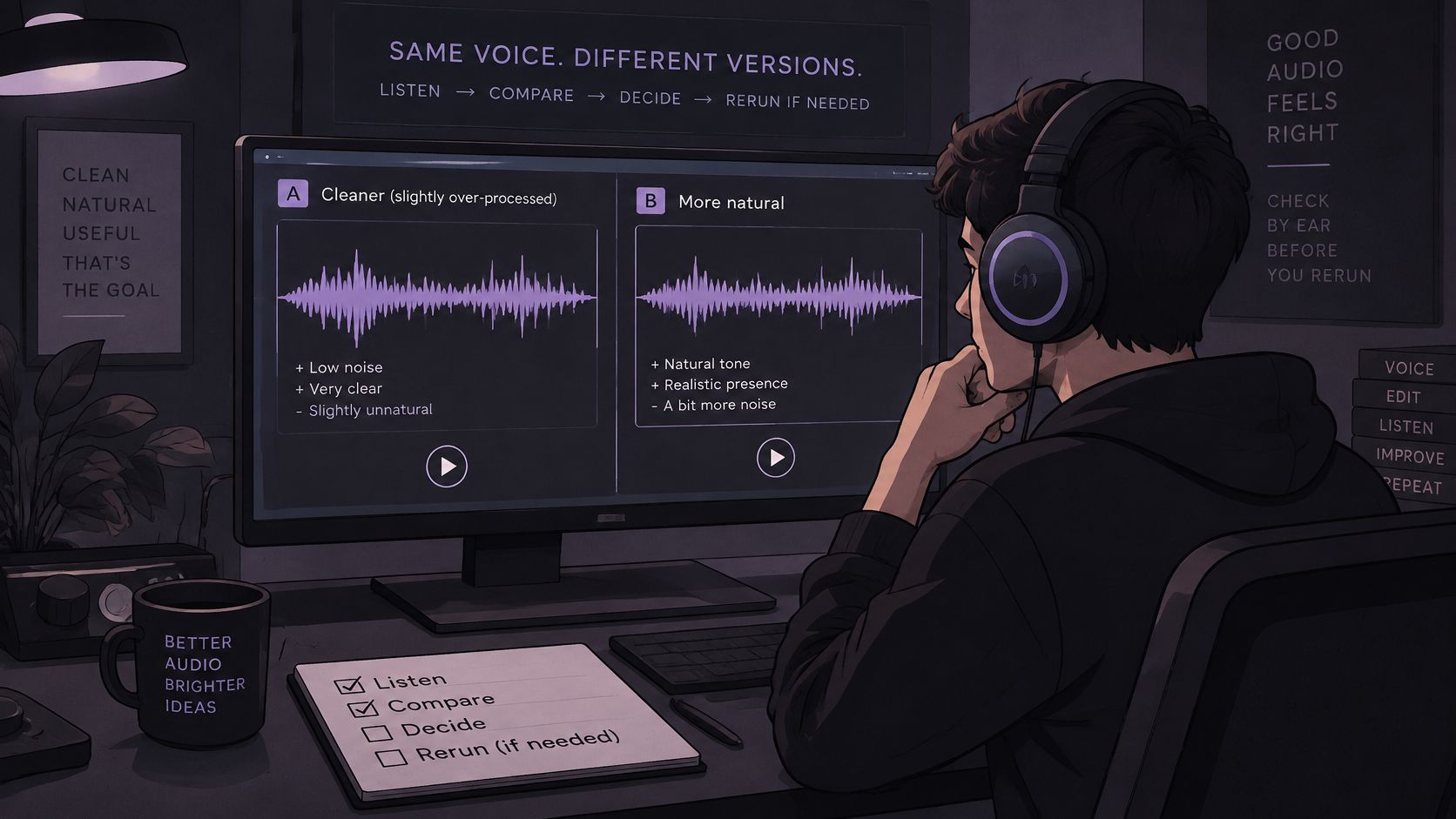
- Compare a difficult passage: Play the same seconds in the original and in each output, and listen for missing or smeared detail.
- Download only what's needed: Proceed only if the balance covers the shown cost and the output serves the project.
Steps one and two prevent a rejected upload and a surprise estimate. Steps three through five confirm the right target and the right output. Steps six and seven stop a download that listening doesn't support.
Why Format Changes the Upload Decision
Cloud media costs aren't driven by processing alone. The AWS guide to how pricing works identifies compute, storage, and outbound data transfer as fundamental cost drivers, with compute commonly billed by time and storage and transfer typically billed by data volume. A single job can touch all three, which is why file services meter more than one cost surface.
Format affects file size directly. The Library of Congress guide to digital audio types describes WAV as an uncompressed format that preserves audio without lossy compression loss but produces substantially larger files, while MP3 uses compression and is typically smaller, and MP4 is commonly associated with video. Checking the actual size before uploading beats assuming a short recording fits.
A clean WAV preserves more source detail when it stays under the cap. A smaller MP3 is more practical when the WAV would be rejected. MP4 and MOV files carry picture as well as sound, so a short clip can approach the limit quickly.
Picking the Right Output for the Job
Prompt wording decides which output deserves attention. Detailed guidance on naming sources appears in the guide to audio isolation prompts. The distinction between multitrack stems and text-guided separation is covered in the comparison of stems and audio isolation. Neither topic needs repeating during a credit check.
For karaoke, isolate "vocals" and audition Background audio. That's the backing track candidate. Downloading Isolated sound instead produces the vocal alone, which suits a different purpose.
For speech, isolate "spoken voice" and audition Isolated sound. Dialogue editors working from video can apply the same cost check through the workflow for removing music from video while keeping voice. The credit habit stays identical. Test short, read the cost, then download.
Cost discipline: A short test that fails costs about 5 credits. A full file that fails costs the full rate and teaches the same lesson.
Credits buy metered processing and a chosen download. They promise no turnaround time and no artifact-free result. Source quality still sets the ceiling.
Repeated full-length trials deserve special caution when the target is ambiguous. A prompt naming several sounds at once invites a muddled split, so narrowing the wording on a short passage first keeps each lesson cheap. Only a test that survives comparison with the original earns a full-length run.
Listening Checks That Avoid Another Run
Separation quality is a tradeoff, not a pass or fail meter. The Adobe Audition noise reduction and restoration reference reports that conventional noise reduction can often improve signal-to-noise ratio by about 5 to 20 dB while retaining high quality, but excessive processing can create flanged or out-of-phase sound. It also notes that at least half a second of noise-only audio can help characterize noise for restoration work.
Saturalabs performs source isolation rather than noise reduction inside a plugin. The listening standard still applies. Wanted sound can disappear while unwanted sound remains, and both failures hide in easy passages.
Three Checks by Use Case
- Speech first: Check quiet words and consonants on Isolated sound, then confirm Background audio didn't retain the sentence.
- Karaoke next: Confirm the lead vocal is gone from Background audio and the band didn't collapse into a thin, watery texture.
- Instrument practice: Listen to attacks and decays, since smeared note starts make a practice part hard to follow.
Play the overlap, not the easy solo section. Speech over music, a vocal inside a full chorus, or a guitar beside a piano exposes problems quickly. Comparing those seconds with the original reveals what the separation removed.
If the target sounds smeared, revise the noun in the prompt or cut a cleaner test section. Don't immediately reprocess the full file. A narrower name on a short passage costs less and shows whether the revision helps.
Credits don't buy perfect separation, a fixed turnaround, or a result that recreates original stems. A mixed recording contains blended information. Some shared frequencies can't be assigned cleanly to one source.
Dialogue jobs dominated by room noise or handling sounds belong in a related workflow. The guide to removing background noise from video covers that situation as the relevant companion process. Credit checks remain the same before any download there.
Rights Stay Separate From Processing
A recorded song can involve two separate copyrighted works. The U.S. Copyright Office guidance for musicians explains that the underlying musical work and the sound recording are commonly owned and licensed separately. Removing vocals for karaoke doesn't automatically grant permission to publish, distribute, or monetize the resulting backing track.
Technical separation can't provide copyright clearance. Rights to the uploaded file and the intended use need confirmation before release. A clean split solves an audio problem only.
Troubleshooting Credits and Uploads
Most credit waste comes from a small set of repeatable failures. Matching the symptom to the fix keeps the next run short. Preparation habits that reduce these failures are detailed in the guide on preparing audio for AI isolation.
Upload and Cost Problems
File rejected. The upload is over 50 MB or outside MP3, WAV, MP4, and MOV. Export a shorter passage or a smaller MP3, then check the file size before uploading again.
Cost higher than expected. The file is longer than remembered, or an MP4 or MOV carries picture as well as sound. Re-read the duration and the displayed figure. The estimate follows minutes, so a misremembered runtime explains most surprises.
Balance too low to download. The shown WAV cost exceeds remaining credits. Subscription users can wait for the monthly reset. Pack buyers can add credits before processing the long version, provided the subscription stays active.
Output Problems That Tempt a Rerun
Background audio still contains the lead vocal. The source name was too broad. Rerun the short test with a narrower name such as "lead vocal" rather than reprocessing the full file. A cheaper test confirms whether the narrower prompt separates better.
Isolated sound drops consonants. The target overlaps other sound in the same frequency range. Test a cleaner section before spending more. If clean passages also lose consonants, the recording itself limits the result.
Repeated runs piling up. Stop after one revision and compare both outputs against the original. Two focused tests reveal more than four rushed ones. Each additional full run spends the same rate for diminishing information.
When two short tests fail in the same place, the source recording is usually the limit, not the prompt wording.
Results depend on the source recording. Heavy reverb, distortion, and dense mixes resist clean separation regardless of spend. Credits don't guarantee artifact-free output or a fixed processing time, so a failed listening check should end the spend, not extend it.
Match a Plan to the Minutes You Need
Choose by monthly minutes first. File count matters less than duration, since processing costs roughly 10 credits per minute across most tools. Prices and included credits can change, so recheck the figures on the Saturalabs pricing page before buying.
Current Saturalabs plans at a glance
| Plan | Price | Credits | Approx. minutes | Included |
|---|---|---|---|---|
| Starter | $7 per month | 150 credits | about 15 minutes | All audio tools, standard processing, AI WAV downloads |
| Pro | $22 per month | 600 credits | about 60 minutes | All audio tools, priority processing, commercial use license |
| Studio | $37 per month | 1,200 credits | about 120 minutes | All audio tools, priority processing, commercial use license |
Starter fits a few short dialogue fixes, karaoke checks, or practice clips. It leaves little room for revisions after the first successful test.
Pro suits a regular episode or weekly editing rhythm, where several full exports and a second prompt attempt need to share the same month. Studio is for hour-scale workloads that recur, such as client deliveries or a batch of episodes.
Subscription credits reset each month and do not carry over. A plan that is too large can still strand unused allowance at reset. Cancellation keeps access and benefits until the end of the billing period, while credit packs act as one-time top-ups that add immediately, normally never expire, and require an active subscription unless checkout states otherwise.
The commercial license on Pro and Studio covers Saturalabs output under the plan terms. Rights in the uploaded recording and intended use remain the customer's responsibility. Spent credits are not refunded, so the safer sequence is one named source, a short audition against the original, then a paid WAV only when the difficult passage improves.
Run that first test through Saturalabs, read the displayed cost on the results screen, and let one convincing passage decide the export.