
In this guide
A podcaster types clean up this recording into an audio isolation tool. The result still contains music, while parts of the voice sound thin. The problem starts before processing: clean up doesn't identify which sound should stay, which should go, or what would make the result usable.
The most useful prompt engineering best practices turn that vague request into a small test: name an audible source, select the intended output, and define a listening check. Better wording isn't the finish line. A usable recording is.
Why Your Wording Decides What Stays
An audio separation tool needs a target, not a general judgment about recording quality. Spoken voice, acoustic guitar, and door closing describe sounds a listener can identify in the file. Professional, better, and clean describe preferences without naming a source.
Saturalabs provides text-guided audio/video isolation, not general video editing or music generation. Its output labels describe opposite sides of the same separation:
- Isolated sound keeps the source named in the prompt.
- Background audio keeps the remaining recording with that source removed or reduced.
The distinction resembles photo editing. A request to make a photo better leaves the intended changes unclear. A direction to brighten the faces while keeping the sky dark identifies both the subject and the boundary. Audio requires an equally concrete target, although separation can't guarantee that every wanted detail survives.
Name the sound, then choose its destination
The existing audio isolation prompts guide covers basic phrasing. For repeatable editing decisions, the useful next step is a reusable test with a named output and an acceptance condition. The audio splitter guide provides additional context for separating a recording into a target and its remainder.
Practical rule: Decide which output belongs in the project before judging whether the separation worked.
A karaoke editor targets vocals but keeps the remainder. A dialogue editor targets spoken voice and keeps the isolated result. The named sound alone doesn't establish the intended deliverable.
A Four-Field Template for Every Prompt
A reusable prompt needs Target, Keep or remove, Output to audition, and Quality check. These fields separate the acoustic task from the editorial decision. They also prevent a common mistake: treating isolating vocals and removing vocals as interchangeable requests.
Prompt template fields
| Field | What to Write | Example |
|---|---|---|
| Target | One audible source in plain words | spoken voice |
| Keep or remove | Whether the named source is kept or removed | Keep the spoken voice |
| Output to audition | Isolated sound or Background audio | Isolated sound |
| Quality check | The one thing to listen for in a difficult passage | Listen for clipped word endings where music overlaps |
Target should describe something audible, not an improvement such as studio quality. Keep or remove records the intended use of that source. Keeping those decisions separate makes an incorrect output selection easier to catch.
The documented prompting guide recommends putting instructions first and separating them from contextual material with clear delimiters. For an audio workflow, labeled lines provide a readable boundary between the requested operation and the recording description. This is a structural principle, not evidence that delimiters improve audio separation by a measurable amount.
A worked dialogue test
An interview with music underneath can use this working record:
Task: Isolate one audible source.
Target: spoken voice
Keep or remove: Keep the spoken voice.
Context: Interview recording with music underneath.
Output to audition: Isolated sound
Quality check: Listen for clipped word endings where the host talks over the music.
The task comes first. Context explains the recording without introducing another extraction target. The quality check identifies an observable failure, rather than asking for an undefined level of quality.
These fields can also serve as an editor's worksheet. A prompt box doesn't necessarily need the entire record: the actual source instruction can remain isolate spoken voice, while the output choice and listening criterion stay in the editing notes. That keeps operational decisions from becoming an unnecessarily long sound description.
Keep a comparison record
Each separation pass targets one described source. The tool doesn't split every instrument at once, so a multi-source job needs separate passes with separate checks.
Record the prompt version, source-file type, selected output, and a brief result note. An entry such as spoken voice, WAV, Isolated sound, speech clear but low hum remains is more useful than a vague rating of good. Compare revisions on the same passage so a different recording doesn't get mistaken for a better prompt.
Keep One Target in Every Prompt
Consider this compound request:
Remove music, isolate speech, and extract applause.
That describes different deliverables, not a single target. Speech needs protection, applause needs extraction, and music needs removal. Adding detail won't resolve the competing objectives unless the editor first separates the jobs.
An evaluation of prompt specificity across coding benchmarks found that explicit input/output requirements, edge-case instructions, and task decomposition contributed to better results. That finding concerns coding tasks, not an audio benchmark. Its useful application here is narrower: define the intended result and test difficult conditions instead of combining unrelated goals.
Split the request into independent tests
Start each pass from the same original passage when comparing source-specific results. Feeding an already degraded result into another pass can make it harder to identify where wanted detail disappeared.
- Dialogue pass: Target
spoken voice, audition Isolated sound, and listen for clipped consonants. - Applause pass: Target
applause, audition Isolated sound, and check whether crowd tails end abruptly. - Music-removal pass: Target
music, audition Background audio, and listen for leftover melody beneath the speech.
These passes produce alternatives for different editorial purposes. They don't automatically create a finished mix, and they shouldn't be treated as interchangeable versions of the same output.
A fuller dialogue instruction could be:
Keep the spoken dialogue; reduce music and room noise; return the isolated dialogue; prioritize intelligibility during overlapping sections.
The protected target remains spoken dialogue. Music and room noise describe interference, not additional sources to extract. If that wording makes the target less clear, shorten it to isolate spoken voice and retain the intelligibility requirement in the listening notes.
Specificity means clearer boundaries, not more adjectives. Test the passage where speech overlaps another sound, compare it with the original, and change only the wording associated with the observed failure. A longer prompt isn't automatically a better test.
Prompt Examples for Each Source Type
The useful difference between source prompts is often the listening criterion, not the sentence length. A dialogue editor cares about intelligibility; a musician practicing guitar needs enough note attack and rhythm to follow the part.
Prompt examples by source type
| Source Type | Target Prompt | Output to Audition | Listening Check |
|---|---|---|---|
| Dialogue from interview or podcast | spoken voice | Isolated sound | Clipped consonants and missing words where speakers overlap |
| Vocals for karaoke | vocals | Background audio | Chorus bleed and leftover lead vocal |
| Instrument for practice | acoustic guitar | Isolated sound | Strum attack and bleed from vocals |
| Sound effect in video | door closing | Isolated sound | Effect tail intact and no room tone in the effect |
Dialogue and karaoke need different deliverables
For an interview or podcast, use isolate spoken voice. Check complete phrases, not just the loudest syllables: missing consonants or shortened word endings can make otherwise clear speech difficult to understand. Where speakers overlap, the test is whether the words needed for the edit remain intelligible, not whether the output sounds silent between sentences.
Persistent room noise calls for a separate decision about noise reduction. The background-noise reduction guide addresses that problem without turning the dialogue prompt into a list of competing requests.
For karaoke, use isolate vocals, then audition Background audio. Listen through the chorus, where leftover lead or backing vocals may be more noticeable than in a sparse verse. The karaoke workflow guide covers the broader preparation process; the prompt test here is whether vocal reduction leaves an accompaniment suitable for singing.
Instruments and effects need their edges preserved
For practice, use isolate acoustic guitar. Check the beginning of each strum as well as the ringing chord. A result can retain a recognizable guitar tone while losing enough attack to obscure the rhythm, which matters more for practice than a little residual vocal bleed.
For a video effect, use isolate door closing. Listen from the initial movement through the impact and decay. An abrupt cutoff can make the effect difficult to place naturally, while excessive retained room tone can reveal a mismatch with the destination scene.
A prompt identifies the sound. The listening check determines whether that sound is useful.
None of these examples establishes a separation threshold. A practice reference, a podcast release, and a foreground film effect require different editorial judgments. Evaluate the result in its intended context, not only as a solo preview.
Fixing Prompts That Return Poor Results
When the target is partly missing, simplify before adding instructions. Extra qualifiers can narrow the description in unintended ways, and naming another source can obscure which sound needs protection. These are troubleshooting possibilities, not diagnoses that can be confirmed from the symptom alone.
Symptoms, causes and prompt fixes
| Symptom | Likely Cause | Prompt Change to Try |
|---|---|---|
| Target partly missing | Extra qualifiers or a second source named | Name only one source and remove extra qualifiers |
| Background audio still has the target | Output or keep-or-remove wording unclear | Restate: keep Background audio, target removed |
| Speech clipped at overlaps | Competing sound in a similar range | Test a shorter passage and split the job |
| Similar instruments bleed into each other | Piano and acoustic guitar share a frequency range | Name one instrument per pass and split the job |
| Reverb carries into the voice | Room echo is part of the recording | Test a shorter passage and check the echo tail on the original first |
| Steady hum or hiss remains | Noise outside the source prompt's scope | Use the noise-removal workflow instead |
| Result changes between runs | Prompt and file changed together | Fix the segment and change one variable |
Separate wording errors from recording limits
If Background audio still contains vocals, first confirm that the correct output is playing. If the selection is correct, the remaining vocal may be separation residue rather than a semantic mistake. Repeatedly rewriting the same target won't necessarily solve it.
Overlap failures need closer listening. Check whether a missing consonant was audible in the original, whether the competing sound covers it, and whether another prompt preserves more speech at the expense of additional bleed. The vocal-removal artifacts guide helps distinguish unwanted remnants from damage to retained material.
For steady hum or hiss, use the video noise-removal workflow rather than expanding an instrument or voice prompt indefinitely. Source separation and noise cleanup address different editing decisions.
Stop when revisions stop helping
Keep a small test set containing exposed sound, overlap, and a quiet ending. The study of prompt refinement and evaluation highlights why refinement without clear performance feedback can be unreliable. A result note should identify what improved and what became worse.
Precise wording can sharpen target definition, but it can't reliably recover information masked by a competing sound. If revisions merely exchange missing detail for more bleed, choose the acceptable compromise, seek a better source recording, or move to manual review. Artifacts can remain even with a well-defined prompt.
Check Both Outputs Before You Download
A good preview in an easy passage isn't enough. The final check should cover the section most likely to fail: overlapping dialogue, a dense chorus, a ringing instrument, or the decay of a short effect.
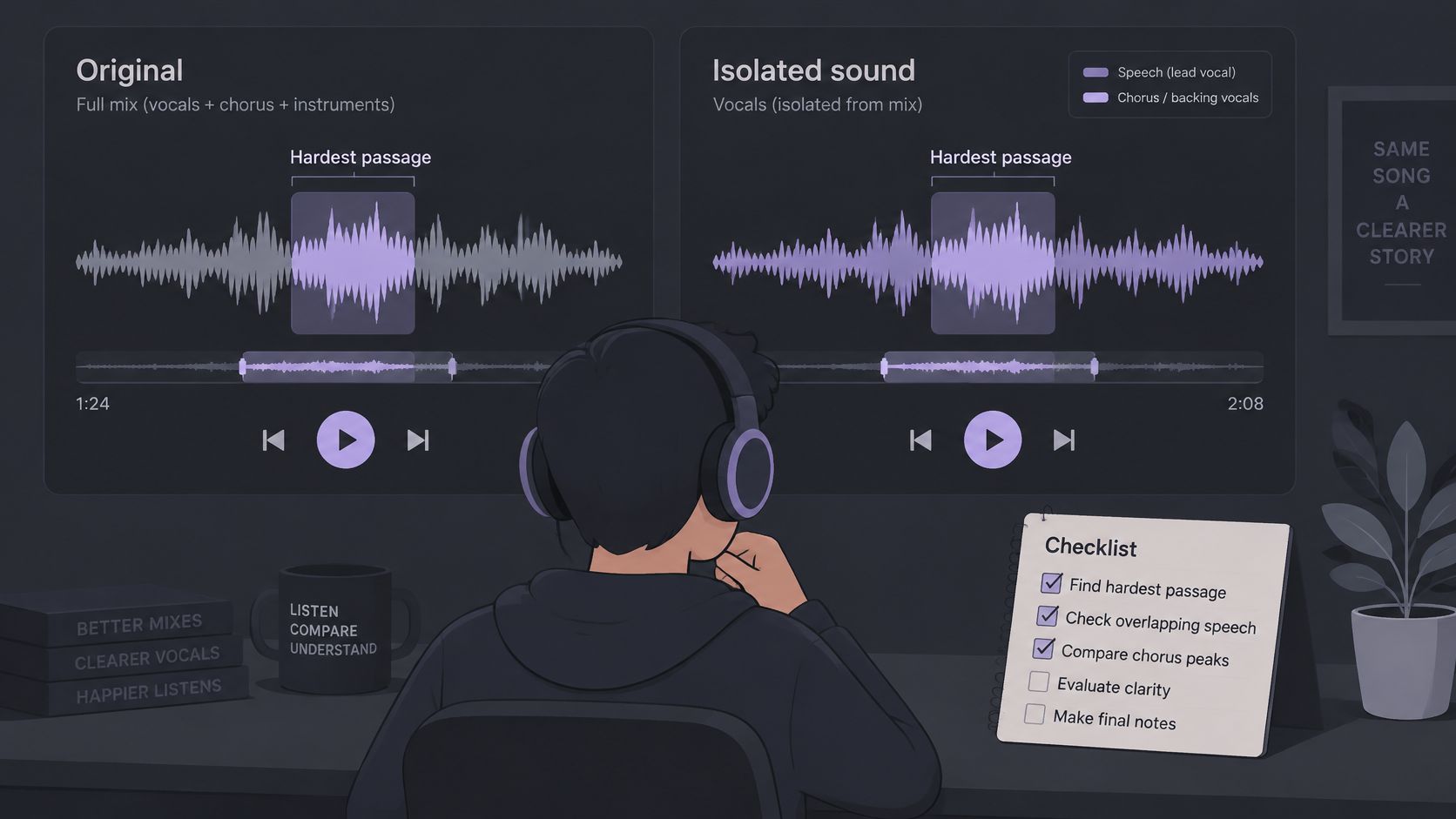
- Play the original at the hardest passage. Establish which details are present before judging the separation.
- Play Isolated sound at the same passage. Note missing words, softened attacks, smeared notes, or shortened tails.
- Play Background audio. Listen for residual target sound and unintended changes to material that should remain.
- Compare the trade-off against the project. A little bleed may be acceptable for practice but distracting in a foreground dialogue edit.
- Download only after the check passes. Confirm that the selected file is the deliverable the project needs.
Check the file and credit cost
Saturalabs accepts MP3, WAV, MP4, and MOV files up to 50 MB. Before submitting a full recording, prepare a short representative clip and test the single-source instruction on that material.
Processing costs approximately 10 credits per minute of file duration for most tools. Check the displayed credit cost before confirming processing, and check any displayed download cost before downloading. Avoid spending on repeated full-length attempts when a short difficult passage can expose the problem.
AI outputs can be inaccurate, incomplete, or unsuitable for a specific purpose. Customers must verify them before relying on them, especially for medical, legal, financial, or safety-critical use. For consequential material, human review should assess whether separation altered meaning or removed relevant evidence.
Confirm publication rights separately
Audio transformation doesn't grant permission to publish. The YouTube music copyright guidance explains that rights holders control use of their music and that Content ID claims can lead to monetization, muting, or worldwide or regional blocking.
Confirm rights to the source recording and intended use, then check the destination platform's policy. Removing a vocal or extracting an instrument isn't copyright clearance. The download decision remains practical: does this particular output preserve what the project needs, with acceptable compromises and appropriate rights?
Saturalabs offers text-guided audio and video isolation for spoken voice, vocals, instruments, and sound effects. Visit Saturalabs to test a short clip with a single-source prompt, audition both outputs, and download only after the listening check passes.